Set EMOJIPT_LANDING_VIDEO_SRC (and optional EMOJIPT_LANDING_VIDEO_POSTER) in
config.js, then refresh.

Stop staring at the cursor. Start visual prompting.
EmojiPT is an AI prompt enhancer that helps you write better instructions for ChatGPT, Gemini, Claude, and any AI chat. Adjust length, tone, audience, and style — see your prompt update instantly.
When the idea became inevitable
The idea was already in my head. Watching Dylan Field at Y Combinator AI Startup School, I heard someone I respect say exactly what I was thinking — and knew I had to build EmojiPT.
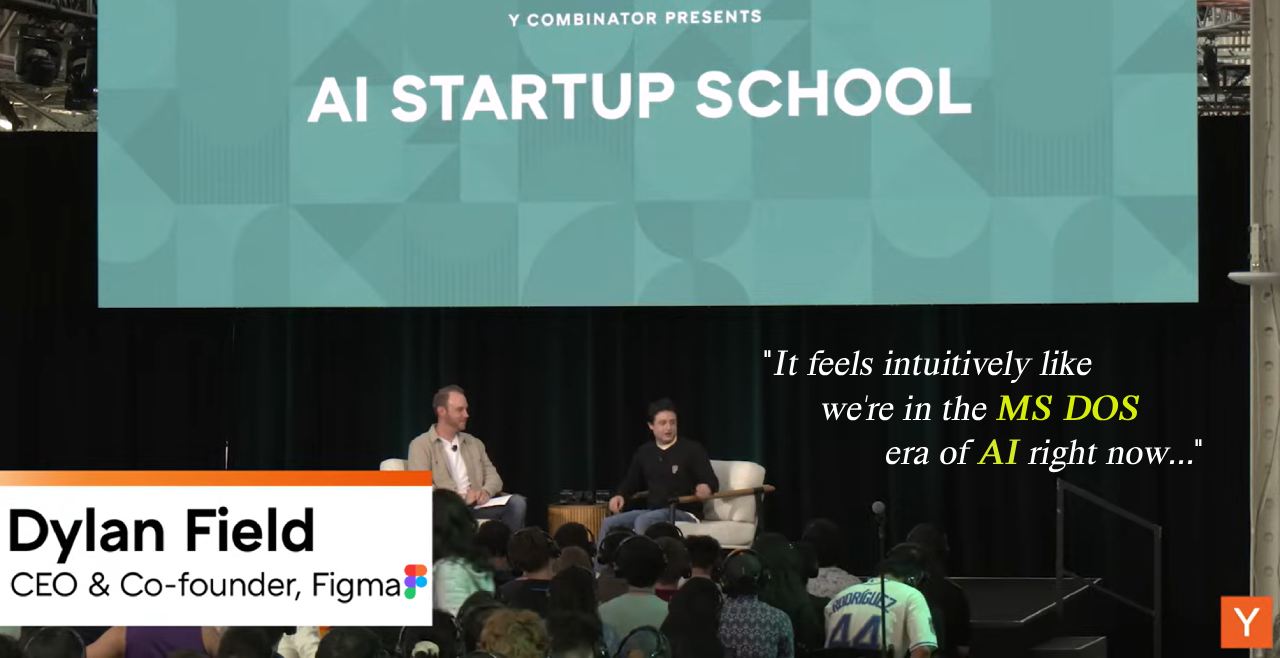
“It feels intuitively like we’re in the MS DOS era of AI right now. If you look back 10 years from now, everyone’s going to go, can you believe that we just had this chat box?”
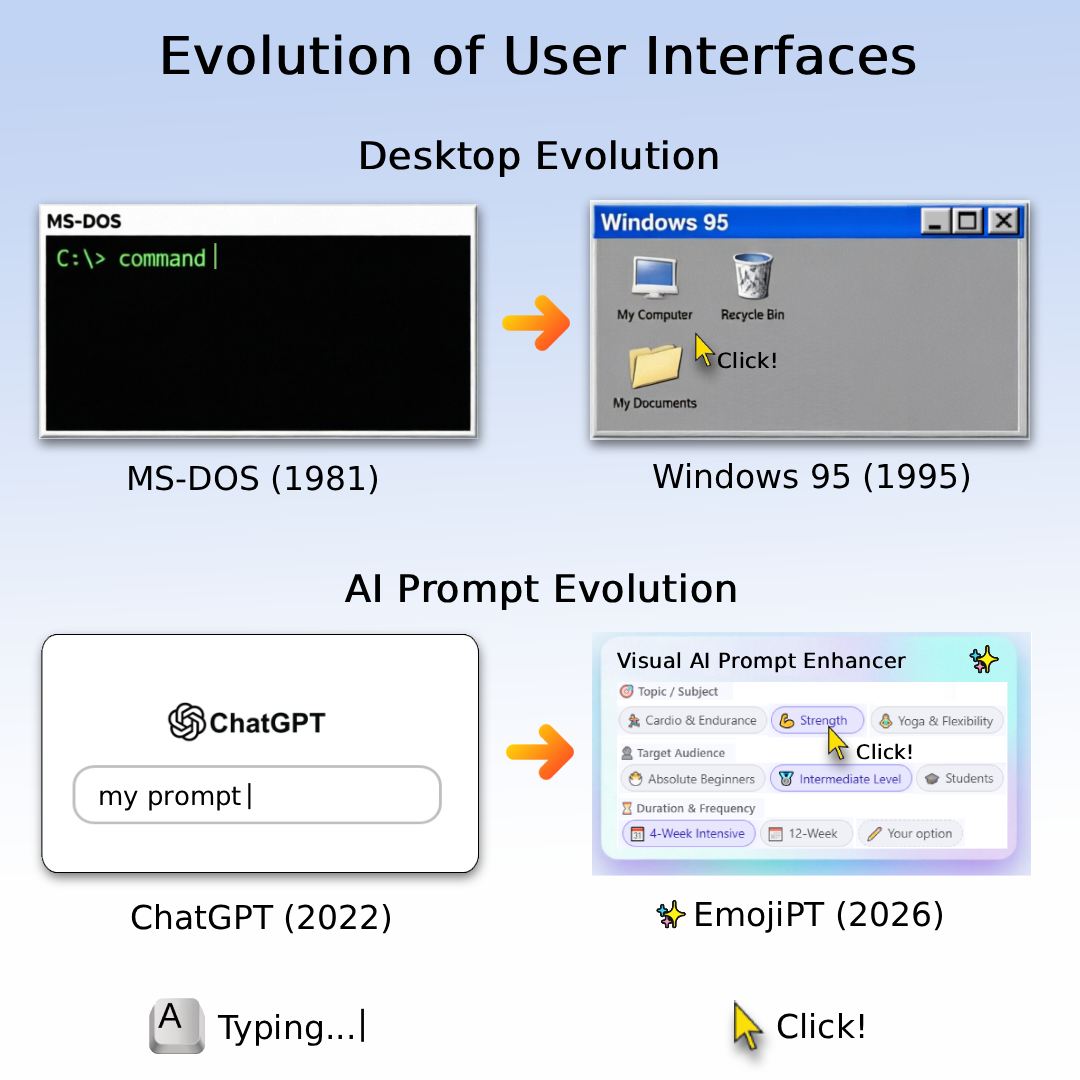
The Evolution of Human‑Computer Interaction
In 1981, you talked to a computer through MS‑DOS. You had to memorize commands. One typo — and nothing worked. The machine expected you to speak its language. Typing.
In 1995, Bill Gates’ Windows changed everything. Suddenly, you could click. You could drag and drop. The computer finally learned to speak human. Click!
In 2007, Steve Jobs’ iPhone did it again. He removed physical buttons, leaving only a screen and intuitive gestures. Millions learned to use it without a manual. Click!
Then came 2022. ChatGPT arrived. It understands natural language. But look at the interface — a blank text box and a blinking cursor. We are back to typing commands from scratch. Every. Single. Time. Typing. Again.
We spent decades teaching computers to understand us. But when it comes to AI, we still type blind.
When Dylan Field called today’s AI the MS-DOS era, it matched what I was already building. In 2026, inspired by this contradiction, Mikle Kunz built EmojiPT.
EmojiPT is a Chrome extension that replaces blind typing with visual prompting. Inside ChatGPT, Claude, Gemini, and 15+ AI chats, it shows a smart panel with emoji‑powered suggestions. Length, tone, audience, style — a few clicks and your prompt is ready.
No more staring at the cursor. No more guessing how to start.
From MS‑DOS to Windows. From iPhone to EmojiPT. The pattern is clear: every breakthrough happens when we replace commands with clicks.
Welcome to the era of visual prompting. Welcome to EmojiPT — Mikle Kunz (MKey)
What makes EmojiPT different:
- 1️⃣ Works as a prompt improver inside any AI chat.
- 2️⃣ Offers contextual hints with emoji — no more guessing.
- 3️⃣ Acts as a visual prompt builder that adapts to your question.
- 4️⃣ Serves as a chatgpt productivity tool for daily tasks.
- 5️⃣ Replaces manual prompt tuning with one-click refinement.
This AI assistant for Chrome is for:
How it works
How EmojiPT works step by step
You type a few words in any AI chat. EmojiPT analyzes your question. A panel opens above the input field. It shows contextual hints with emoji.
Each hint represents a different way to continue your thought. You can adjust length, tone, audience, style, response format — whatever fits your task.
Click one option. Your prompt updates instantly in the preview. Click another option. It changes again. You see the result before you send anything.
When you are happy with the result, click the insert button. The finished prompt appears in your chat. One more click sends it.
All of this happens without leaving your chat window. No tabs. No copy-paste. Just a smooth, visual workflow.
This is how an AI prompt optimizer should feel. Fast. Clear. Helpful. No friction.
Comparison
Why EmojiPT is different from Prompt Perfect, Pretty Prompt, and others
You may have tried other chatgpt productivity tools. Prompt Perfect offers fixes but no visual control. Pretty Prompt gives templates but does not adapt to your context. AIPRM provides a library but feels heavy.
EmojiPT takes a different approach. It is not a library. It is not a grammar checker. It is a visual prompt builder that works as you type.
Think of it as grammarly for chatgpt but for prompt structure instead of spelling. Or as a writing assistant for AI that focuses on meaning, not just correctness.
You do not need to install chatgpt helper separately. EmojiPT works across all AI chats. It is a true AI prompt helper that feels like a natural part of the interface.
No learning curve. No complex settings. Just a panel that appears when you need it and disappears when you do not.
FAQ
Frequently Asked Questions
Q: Do I need to pay for EmojiPT?
A: EmojiPT offers a free tier with daily requests. No credit card required to start.
Q: Does it work with Claude and Gemini?
A: Yes. EmojiPT is an AI prompt enhancer for any AI chat. Use it as an anthropic claude prompt improver or with Gemini.
Q: How is this different from Prompt Perfect?
A: Prompt Perfect fixes your prompt after you write it. EmojiPT helps you build it as you type — a true prompt builder.
Q: Can I use my own API key?
A: Yes. You can bring your own key for unlimited requests. Or use the free daily quota.
Q: Is my data safe?
A: Absolutely. Your prompts stay on your device. No external servers store your conversations.
Q: How do I learn to write better prompts?
A: EmojiPT acts as a prompting guide. Every suggestion teaches you how to write better prompts over time.
What you get with EmojiPT:
Quick facts about EmojiPT:
- Works as an anthropic claude prompt improver too — not just for ChatGPT.
- Can be used as an improv prompt generator for creative writing.
- Offers a prompting guide through its contextual suggestions.
- Acts as an open AI prompt optimizer without sending your data to external servers.
- Provides a visual writing prompts experience that feels like autocomplete on steroids.
Get started
Struggling with how to writing prompt? Not sure how to prompt AI to write like a human? You just need the right
starting point.
EmojiPT solves this instantly:
Meet the EmojiPT team
one brain, many hats • no boardroom, just a laptop

Mikle Kunz (MKey)
⚡ Founder & the Only Executive
👑 One‑person army • 🕹️ Full ownership • 🤘 Zero ego
Product & Strategy
MKey
Chief Product Psychologist · “translating 'make it pop' into real tasks”
Growth & Marketing
MKey
Head of Vibes & Visibility · “arguing with algorithms so you don’t have to”
Engineering & BI
MKey
Lead Code Alchemist · “turning coffee into 1s & 0s, debugging dreams”
Operations & QA
MKey
Minister of Sanity · “the one who finally clicks 'publish'”
Investor & Partnerships
MKey
Chief Enthusiasm Officer · “still looking for someone else to do this part”
Chief Drinking Officer
MKey (the guy who approves pizza & coffee restocks) — fully unofficial, highly essential